[ AxiomCore · Documentation ]
Run your first app
Clone the task app, run its Acore UI and API, and confirm that SQLite keeps your tasks.
Run a task list built with an Acore UI, an Acore backend and a real SQLite database, then confirm your tasks survive reloads and restarts. You need no Cloud account, extractor or database server.
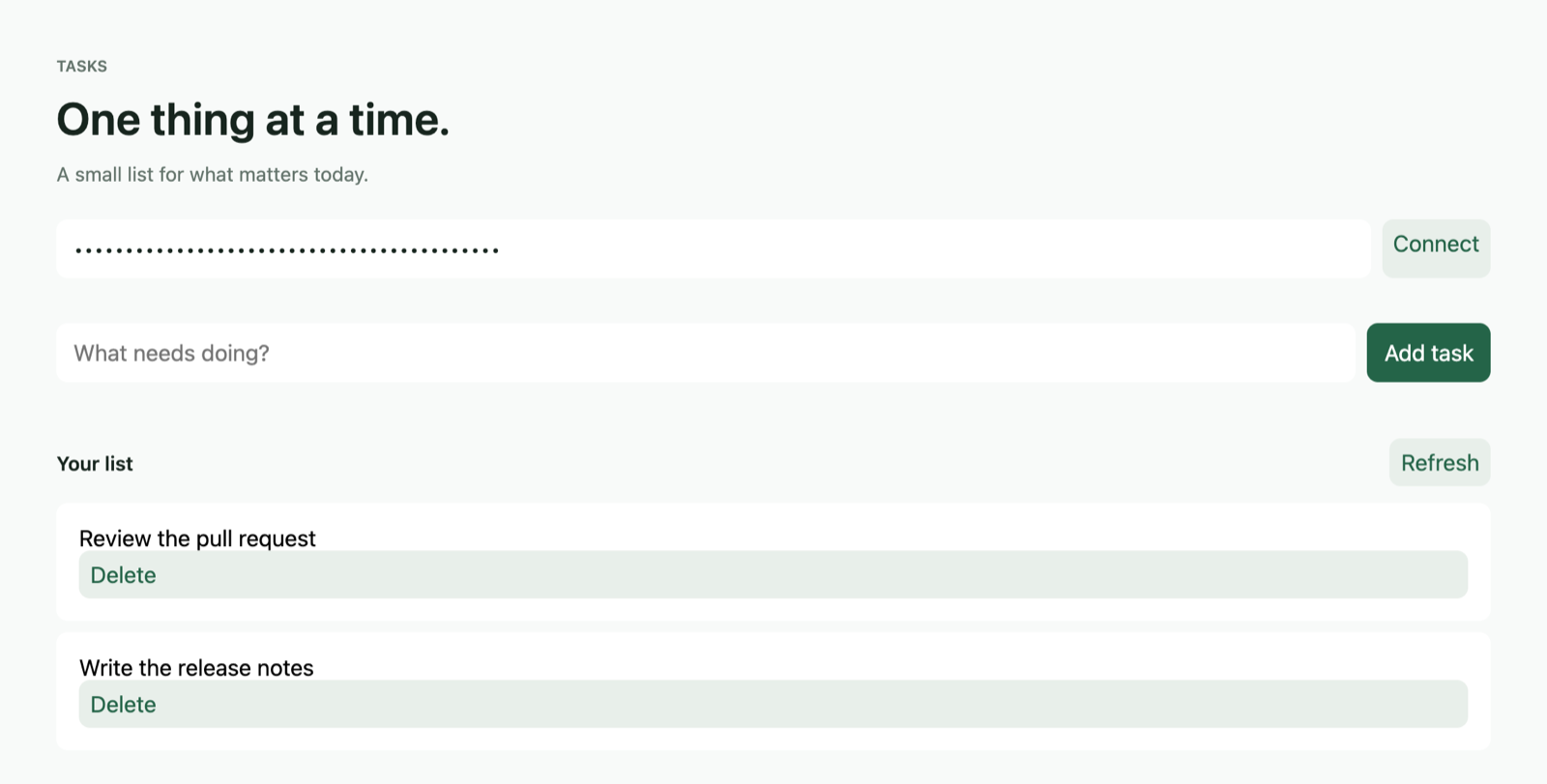
The screenshot shows the app connected to its local API. The rows come from SQLite, not from mock responses.
%20*%2F%0A%20%20%20%20--_text%3A%20%20%20%20%20%20%20%20%20%20var(--fg)%3B%0A%20%20%20%20--_text-sec%3A%20%20%20%20%20%20var(--muted%2C%20color-mix(in%20srgb%2C%20var(--fg)%2060%25%2C%20var(--bg)))%3B%0A%20%20%20%20--_text-muted%3A%20%20%20%20var(--muted%2C%20color-mix(in%20srgb%2C%20var(--fg)%2040%25%2C%20var(--bg)))%3B%0A%20%20%20%20--_text-faint%3A%20%20%20%20color-mix(in%20srgb%2C%20var(--fg)%2025%25%2C%20var(--bg))%3B%0A%20%20%20%20--_line%3A%20%20%20%20%20%20%20%20%20%20var(--line%2C%20color-mix(in%20srgb%2C%20var(--fg)%2050%25%2C%20var(--bg)))%3B%0A%20%20%20%20--_arrow%3A%20%20%20%20%20%20%20%20%20var(--accent%2C%20color-mix(in%20srgb%2C%20var(--fg)%2085%25%2C%20var(--bg)))%3B%0A%20%20%20%20--_node-fill%3A%20%20%20%20%20var(--surface%2C%20color-mix(in%20srgb%2C%20var(--fg)%203%25%2C%20var(--bg)))%3B%0A%20%20%20%20--_node-stroke%3A%20%20%20var(--border%2C%20color-mix(in%20srgb%2C%20var(--fg)%2020%25%2C%20var(--bg)))%3B%0A%20%20%20%20--_group-fill%3A%20%20%20%20var(--bg)%3B%0A%20%20%20%20--_group-hdr%3A%20%20%20%20%20color-mix(in%20srgb%2C%20var(--fg)%205%25%2C%20var(--bg))%3B%0A%20%20%20%20--_inner-stroke%3A%20%20color-mix(in%20srgb%2C%20var(--fg)%2012%25%2C%20var(--bg))%3B%0A%20%20%20%20--_key-badge%3A%20%20%20%20%20color-mix(in%20srgb%2C%20var(--fg)%2010%25%2C%20var(--bg))%3B%0A%20%20%7D%0A%3C%2Fstyle%3E%0A%3Cdefs%3E%0A%20%20%3Cmarker%20id%3D%22arrowhead%22%20markerWidth%3D%228%22%20markerHeight%3D%225%22%20refX%3D%227%22%20refY%3D%222.5%22%20orient%3D%22auto%22%3E%0A%20%20%20%20%3Cpolygon%20points%3D%220%200%2C%208%202.5%2C%200%205%22%20fill%3D%22var(--_arrow)%22%20stroke%3D%22var(--_arrow)%22%20stroke-width%3D%220.75%22%20stroke-linejoin%3D%22round%22%20%2F%3E%0A%20%20%3C%2Fmarker%3E%0A%20%20%3Cmarker%20id%3D%22arrowhead-start%22%20markerWidth%3D%228%22%20markerHeight%3D%225%22%20refX%3D%221%22%20refY%3D%222.5%22%20orient%3D%22auto-start-reverse%22%3E%0A%20%20%20%20%3Cpolygon%20points%3D%228%200%2C%200%202.5%2C%208%205%22%20fill%3D%22var(--_arrow)%22%20stroke%3D%22var(--_arrow)%22%20stroke-width%3D%220.75%22%20stroke-linejoin%3D%22round%22%20%2F%3E%0A%20%20%3C%2Fmarker%3E%0A%3C%2Fdefs%3E%0A%3Cpolyline%20class%3D%22edge%22%20data-from%3D%22A%22%20data-to%3D%22B%22%20data-style%3D%22solid%22%20data-arrow-start%3D%22false%22%20data-arrow-end%3D%22true%22%20data-label%3D%22request%20with%20API%20key%22%20points%3D%22254.60999999999999%2C38.45%20454.706%2C38.45%22%20fill%3D%22none%22%20stroke%3D%22var(--_line)%22%20stroke-width%3D%221%22%20marker-end%3D%22url(%23arrowhead)%22%20%2F%3E%0A%3Cpolyline%20class%3D%22edge%22%20data-from%3D%22B%22%20data-to%3D%22C%22%20data-style%3D%22solid%22%20data-arrow-start%3D%22false%22%20data-arrow-end%3D%22true%22%20points%3D%22648.561%2C38.45%20696.561%2C38.45%22%20fill%3D%22none%22%20stroke%3D%22var(--_line)%22%20stroke-width%3D%221%22%20marker-end%3D%22url(%23arrowhead)%22%20%2F%3E%0A%3Cg%20class%3D%22edge-label%22%20data-from%3D%22A%22%20data-to%3D%22B%22%20data-label%3D%22request%20with%20API%20key%22%3E%0A%20%20%3Crect%20x%3D%22298.61%22%20y%3D%2222.450000000000003%22%20width%3D%22112.09600000000002%22%20height%3D%2230.3%22%20rx%3D%222%22%20ry%3D%222%22%20fill%3D%22var(--bg)%22%20stroke%3D%22var(--_inner-stroke)%22%20stroke-width%3D%221%22%20%2F%3E%0A%20%20%3Ctext%20x%3D%22354.658%22%20y%3D%2237.6%22%20text-anchor%3D%22middle%22%20font-size%3D%2211%22%20font-weight%3D%22400%22%20fill%3D%22var(--_text-sec)%22%20dy%3D%223.8499999999999996%22%3Erequest%20with%20API%20key%3C%2Ftext%3E%0A%3C%2Fg%3E%0A%3Cg%20class%3D%22node%22%20data-id%3D%22A%22%20data-label%3D%22Acore%20UI%20in%20the%20browser%2C%20port%205173%22%20data-shape%3D%22rectangle%22%3E%0A%20%20%3Crect%20x%3D%2220%22%20y%3D%2220%22%20width%3D%22234.60999999999999%22%20height%3D%2236.900000000000006%22%20rx%3D%220%22%20ry%3D%220%22%20fill%3D%22var(--_node-fill)%22%20stroke%3D%22var(--_node-stroke)%22%20stroke-width%3D%220.75%22%20%2F%3E%0A%20%20%3Ctext%20x%3D%22137.305%22%20y%3D%2238.45%22%20text-anchor%3D%22middle%22%20font-size%3D%2213%22%20font-weight%3D%22500%22%20fill%3D%22var(--_text)%22%20dy%3D%224.55%22%3EAcore%20UI%20in%20the%20browser%2C%20port%205173%3C%2Ftext%3E%0A%3C%2Fg%3E%0A%3Cg%20class%3D%22node%22%20data-id%3D%22B%22%20data-label%3D%22Acore%20backend%2C%20port%208080%22%20data-shape%3D%22rectangle%22%3E%0A%20%20%3Crect%20x%3D%22454.706%22%20y%3D%2220%22%20width%3D%22193.85500000000002%22%20height%3D%2236.900000000000006%22%20rx%3D%220%22%20ry%3D%220%22%20fill%3D%22var(--_node-fill)%22%20stroke%3D%22var(--_node-stroke)%22%20stroke-width%3D%220.75%22%20%2F%3E%0A%20%20%3Ctext%20x%3D%22551.6335%22%20y%3D%2238.45%22%20text-anchor%3D%22middle%22%20font-size%3D%2213%22%20font-weight%3D%22500%22%20fill%3D%22var(--_text)%22%20dy%3D%224.55%22%3EAcore%20backend%2C%20port%208080%3C%2Ftext%3E%0A%3C%2Fg%3E%0A%3Cg%20class%3D%22node%22%20data-id%3D%22C%22%20data-label%3D%22SQLite%20database%20file%22%20data-shape%3D%22rectangle%22%3E%0A%20%20%3Crect%20x%3D%22696.561%22%20y%3D%2220%22%20width%3D%22157.546%22%20height%3D%2236.900000000000006%22%20rx%3D%220%22%20ry%3D%220%22%20fill%3D%22var(--_node-fill)%22%20stroke%3D%22var(--_node-stroke)%22%20stroke-width%3D%220.75%22%20%2F%3E%0A%20%20%3Ctext%20x%3D%22775.3340000000001%22%20y%3D%2238.45%22%20text-anchor%3D%22middle%22%20font-size%3D%2213%22%20font-weight%3D%22500%22%20fill%3D%22var(--_text)%22%20dy%3D%224.55%22%3ESQLite%20database%20file%3C%2Ftext%3E%0A%3C%2Fg%3E%0A%3C%2Fsvg%3E)
Diagram source
flowchart LR
  A[Acore UI in the browser, port 5173] -->|request with API key| B[Acore backend, port 8080]
  B --> C[SQLite database file]
Prerequisites
- Axiom CLI 0.149.1. This walkthrough is checked on macOS arm64.
git, a browser and two terminals. Ports 8080 and 5173 must be free.- The web UI host 0.6.12:
axiom ui host install --target web --version 0.6.12 --non-interactiveVerified and installed Axiom UI Host 0.6.12 (browser) for web.1. Get the source
git clone --depth 1 https://github.com/AxiomCore/AxiomCore.git
cd AxiomCore/examples/documentation/task-app
The shallow clone is about 6 MB. The example has three parts:
task-app/
  backend/          # sqlite.acore, application.acore, Task.acore, AxiomDeps.toml
  database/sqlite/  # schema.acore, AxiomDeps.toml
  frontend/         # main.acore, AxiomDeps.toml
Each AxiomDeps.toml manifest belongs with its source. The frontend manifest
points at the local backend contract and the API base URL
http://127.0.0.1:8080.
2. Start the backend
From the task-app directory:
unset DATABASE_URL
axiom check backend/sqlite.acore
axiom run backend/sqlite.acore --port 8080Valid backend contract: backend/sqlite.acore
Connected to <task-app>/database/sqlite/.axiom/database/data/database.sqlite · SQLite
Migration 1.0.0
add Schemas.main
add Tables.main.tasks
Validating migration internally…
Applied migration 1.0.0 · database verified
Development API key: <key>
Backend: http://127.0.0.1:8080A JSON status line follows. The CLI created the SQLite database, applied schema
version 1.0.0 and printed a development API key. Keep this process running
and keep the key local. Unsetting DATABASE_URL stops the CLI from using an
unrelated database from your shell.
3. Start the frontend
Open a second terminal in the same task-app directory:
axiom run frontend/main.acore --target web --port 5173UI compiled (#1).
AUI059 development contract `tasks` uses an unsigned local artifact; a production release requires Axiom Cloud signing
Axiom UI is ready at http://127.0.0.1:5173/ (pass --launch to open a browser)The AUI059 warning is expected: the local backend contract is unsigned.
Open http://127.0.0.1:5173. Paste the development key from Terminal 1 and
select Connect. Add a task. After each change the list refreshes from the
contract.
4. Verify persistence and errors
-
Add two different tasks. Both appear in the list.
-
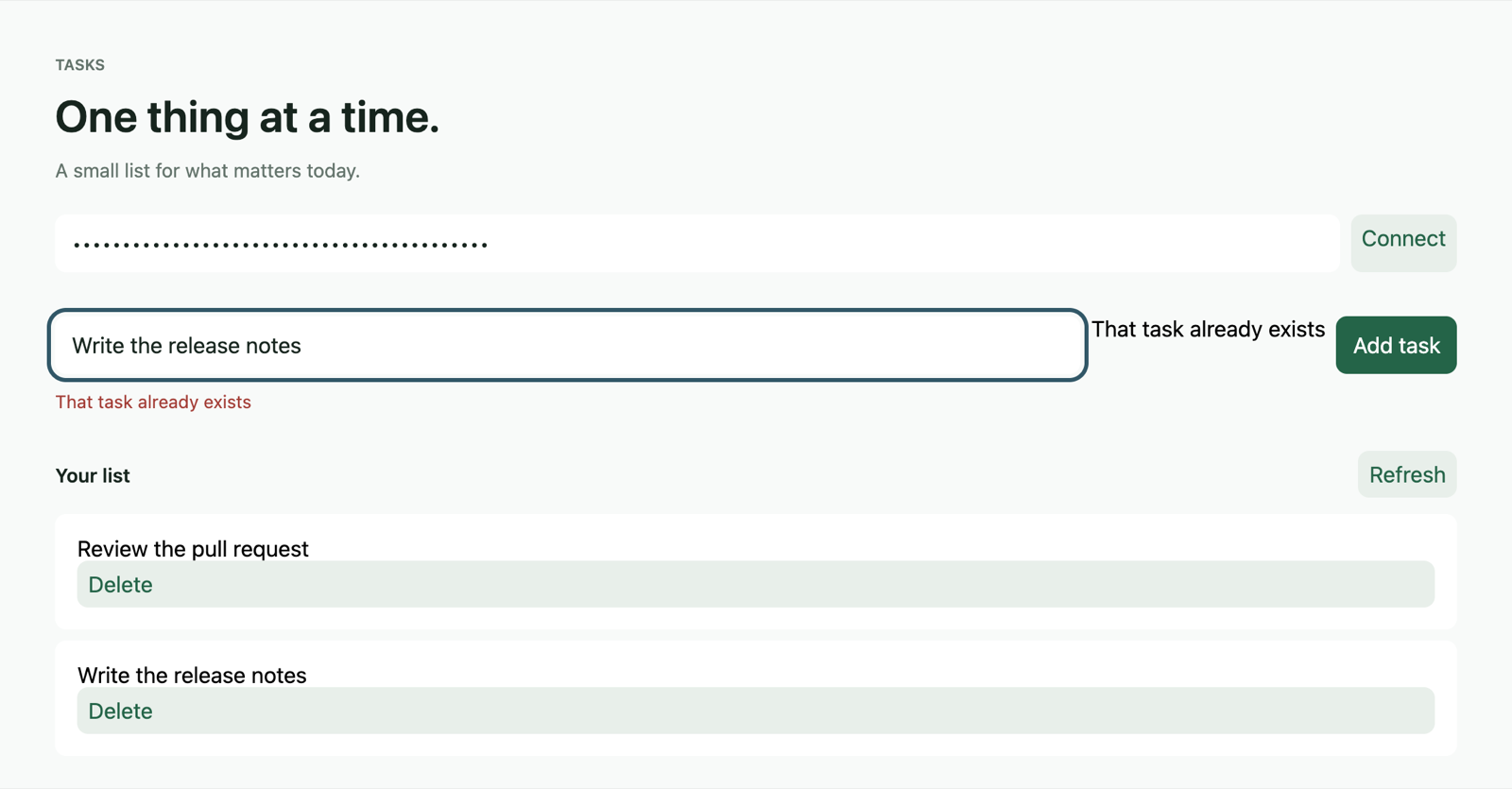
Add a title that already exists. The app shows That task already exists; the API returned HTTP 409.
-
Reload the page and reconnect. Both tasks remain.
-
Delete a task, reload and reconnect. The task stays deleted.
-
Stop the backend with Ctrl-C, start it again with the same command, reconnect, and check that the remaining tasks are still there.
The backend also validates titles (1 to 120 characters) and supports renaming a task through the API. Task app shows the request shapes and the source behind each operation.
How the parts connect
frontend/AxiomDeps.tomlbinds the aliastasksto the backend contract at../backend/.axiom/contracts/backend.axiom, with base URLhttp://127.0.0.1:8080, audienceweband four operations.backend/sqlite.acoremaps the backend'stasksresource to themain.taskstable defined indatabase/sqlite/schema.acore. List responses return at most 100 tasks.- This is a local teaching app with one development identity and one tenant. It has no production login or deployment configuration.
Troubleshooting
| Symptom | Fix |
|---|---|
| Web host missing or incompatible | Install version 0.6.12 as shown; check it with axiom ui host status --target web. |
| UI cannot load tasks | Check that the backend is running, the key is pasted, and baseUrl in frontend/AxiomDeps.toml matches. |
| Port already in use | Change the port in the command, the frontend manifest's baseUrl and the backend's cors origins in backend/application.acore together. |
| Wrong database selected | Run unset DATABASE_URL and restart the backend. |
| Edits to backend files have no effect | Stop both processes, run axiom build backend/sqlite.acore, then start both again. |
To change the schema, change the database project version in
database/sqlite/schema.acore before you apply it.
Cleanup
Stop both processes with Ctrl-C. The data stays in
database/sqlite/.axiom/database/data/database.sqlite inside the clone. Keep
the clone to continue, or delete the AxiomCore directory when you no longer
need its data.