[ AxiomCore · Documentation ]
Task app
Trace a task from the Acore UI through a typed backend into SQLite, with every file, endpoint and failure the example declares.
The task app creates, lists, renames and deletes tasks with real SQLite persistence. Its UI, backend and schema are all written in Acore. This page explains how the parts fit together; Run your first app walks through running it step by step.
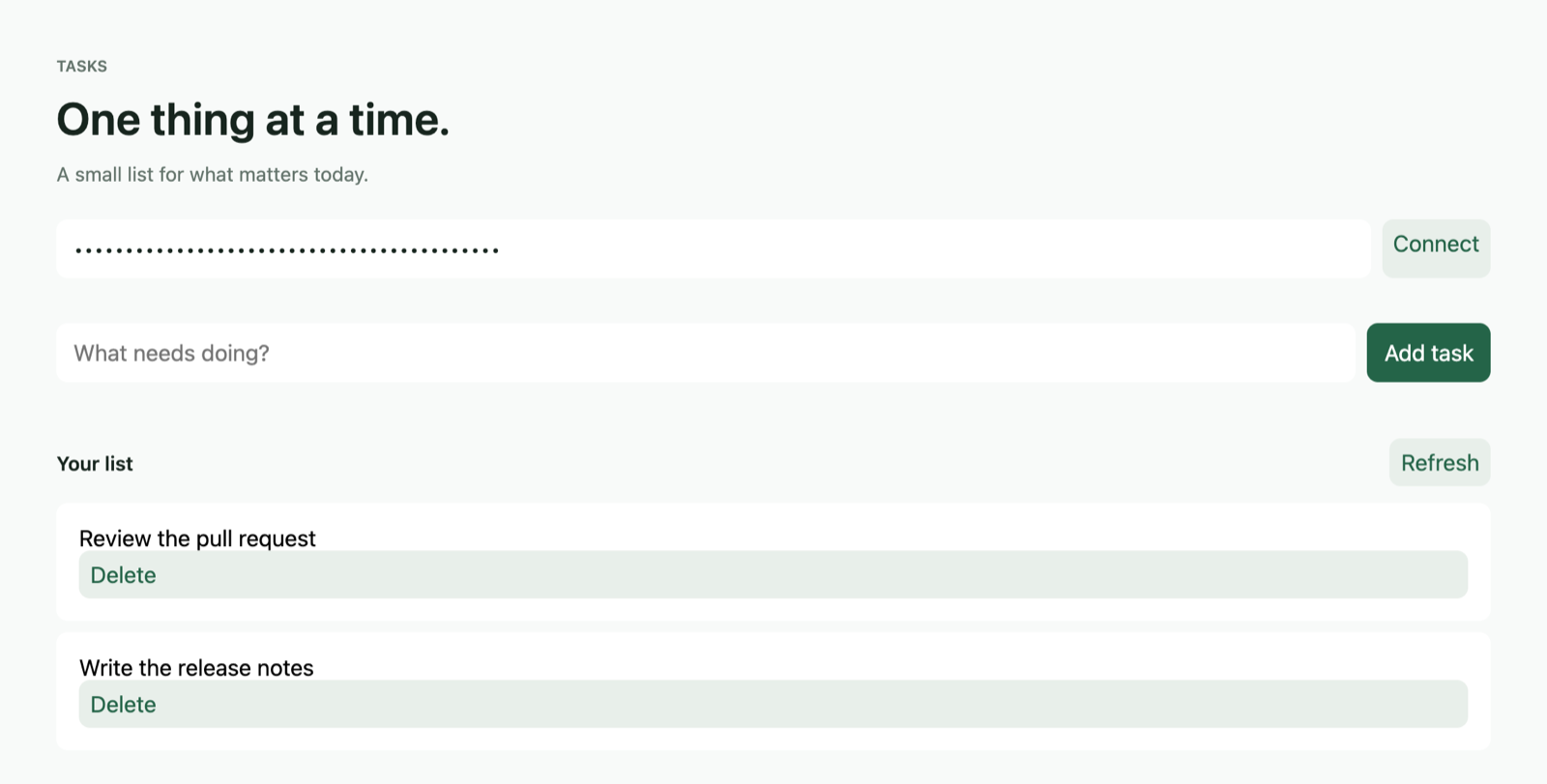
Run it
You need Axiom CLI 0.149.1 on macOS arm64,
the web UI host 0.6.12
(axiom ui host install --target web --version 0.6.12 --non-interactive), a
browser, two terminals, and free ports 8080 and 5173.
git clone --depth 1 https://github.com/AxiomCore/AxiomCore.git
cd AxiomCore/examples/documentation/task-app
unset DATABASE_URL
axiom check backend/sqlite.acore
axiom run backend/sqlite.acore --port 8080axiom run frontend/main.acore --target web --port 5173Open http://127.0.0.1:5173, paste the development API key that Terminal 1
printed, and select Connect. The quickstart
shows the expected output and troubleshooting.
How a request reaches the data
%20*%2F%0A%20%20%20%20--_text%3A%20%20%20%20%20%20%20%20%20%20var(--fg)%3B%0A%20%20%20%20--_text-sec%3A%20%20%20%20%20%20var(--muted%2C%20color-mix(in%20srgb%2C%20var(--fg)%2060%25%2C%20var(--bg)))%3B%0A%20%20%20%20--_text-muted%3A%20%20%20%20var(--muted%2C%20color-mix(in%20srgb%2C%20var(--fg)%2040%25%2C%20var(--bg)))%3B%0A%20%20%20%20--_text-faint%3A%20%20%20%20color-mix(in%20srgb%2C%20var(--fg)%2025%25%2C%20var(--bg))%3B%0A%20%20%20%20--_line%3A%20%20%20%20%20%20%20%20%20%20var(--line%2C%20color-mix(in%20srgb%2C%20var(--fg)%2050%25%2C%20var(--bg)))%3B%0A%20%20%20%20--_arrow%3A%20%20%20%20%20%20%20%20%20var(--accent%2C%20color-mix(in%20srgb%2C%20var(--fg)%2085%25%2C%20var(--bg)))%3B%0A%20%20%20%20--_node-fill%3A%20%20%20%20%20var(--surface%2C%20color-mix(in%20srgb%2C%20var(--fg)%203%25%2C%20var(--bg)))%3B%0A%20%20%20%20--_node-stroke%3A%20%20%20var(--border%2C%20color-mix(in%20srgb%2C%20var(--fg)%2020%25%2C%20var(--bg)))%3B%0A%20%20%20%20--_group-fill%3A%20%20%20%20var(--bg)%3B%0A%20%20%20%20--_group-hdr%3A%20%20%20%20%20color-mix(in%20srgb%2C%20var(--fg)%205%25%2C%20var(--bg))%3B%0A%20%20%20%20--_inner-stroke%3A%20%20color-mix(in%20srgb%2C%20var(--fg)%2012%25%2C%20var(--bg))%3B%0A%20%20%20%20--_key-badge%3A%20%20%20%20%20color-mix(in%20srgb%2C%20var(--fg)%2010%25%2C%20var(--bg))%3B%0A%20%20%7D%0A%3C%2Fstyle%3E%0A%3Cdefs%3E%0A%20%20%3Cmarker%20id%3D%22seq-arrow%22%20markerWidth%3D%228%22%20markerHeight%3D%225%22%20refX%3D%228%22%20refY%3D%222.5%22%20orient%3D%22auto-start-reverse%22%3E%0A%20%20%20%20%3Cpolygon%20points%3D%220%200%2C%208%202.5%2C%200%205%22%20fill%3D%22var(--_arrow)%22%20%2F%3E%0A%20%20%3C%2Fmarker%3E%0A%20%20%3Cmarker%20id%3D%22seq-arrow-open%22%20markerWidth%3D%228%22%20markerHeight%3D%225%22%20refX%3D%228%22%20refY%3D%222.5%22%20orient%3D%22auto-start-reverse%22%3E%0A%20%20%20%20%3Cpolyline%20points%3D%220%200%2C%208%202.5%2C%200%205%22%20fill%3D%22none%22%20stroke%3D%22var(--_arrow)%22%20stroke-width%3D%221%22%20%2F%3E%0A%20%20%3C%2Fmarker%3E%0A%3C%2Fdefs%3E%0A%3Cline%20class%3D%22lifeline%22%20data-actor%3D%22Browser%22%20x1%3D%2272.91%22%20y1%3D%2270%22%20x2%3D%2272.91%22%20y2%3D%22290%22%20stroke%3D%22var(--_line)%22%20stroke-width%3D%220.75%22%20stroke-dasharray%3D%226%204%22%20%2F%3E%0A%3Cline%20class%3D%22lifeline%22%20data-actor%3D%22API%22%20x1%3D%22212.91%22%20y1%3D%2270%22%20x2%3D%22212.91%22%20y2%3D%22290%22%20stroke%3D%22var(--_line)%22%20stroke-width%3D%220.75%22%20stroke-dasharray%3D%226%204%22%20%2F%3E%0A%3Cline%20class%3D%22lifeline%22%20data-actor%3D%22SQLite%22%20x1%3D%22352.90999999999997%22%20y1%3D%2270%22%20x2%3D%22352.90999999999997%22%20y2%3D%22290%22%20stroke%3D%22var(--_line)%22%20stroke-width%3D%220.75%22%20stroke-dasharray%3D%226%204%22%20%2F%3E%0A%3Cg%20class%3D%22message%22%20data-from%3D%22Browser%22%20data-to%3D%22API%22%20data-label%3D%22Create%20a%20task%20with%20a%20development%20API%20key%22%20data-line-style%3D%22solid%22%20data-arrow-head%3D%22filled%22%20data-self%3D%22false%22%3E%0A%20%20%3Cline%20x1%3D%2272.91%22%20y1%3D%2290%22%20x2%3D%22212.91%22%20y2%3D%2290%22%20stroke%3D%22var(--_line)%22%20stroke-width%3D%221%22%20marker-end%3D%22url(%23seq-arrow)%22%20%2F%3E%0A%20%20%3Ctext%20x%3D%22142.91%22%20y%3D%2280%22%20font-size%3D%2211%22%20text-anchor%3D%22middle%22%20font-weight%3D%22400%22%20fill%3D%22var(--_text-muted)%22%20dy%3D%223.8499999999999996%22%3ECreate%20a%20task%20with%20a%20development%20API%20key%3C%2Ftext%3E%0A%3C%2Fg%3E%0A%3Cg%20class%3D%22message%22%20data-from%3D%22API%22%20data-to%3D%22SQLite%22%20data-label%3D%22Validate%20and%20insert%20the%20record%22%20data-line-style%3D%22solid%22%20data-arrow-head%3D%22filled%22%20data-self%3D%22false%22%3E%0A%20%20%3Cline%20x1%3D%22212.91%22%20y1%3D%22130%22%20x2%3D%22352.90999999999997%22%20y2%3D%22130%22%20stroke%3D%22var(--_line)%22%20stroke-width%3D%221%22%20marker-end%3D%22url(%23seq-arrow)%22%20%2F%3E%0A%20%20%3Ctext%20x%3D%22282.90999999999997%22%20y%3D%22120%22%20font-size%3D%2211%22%20text-anchor%3D%22middle%22%20font-weight%3D%22400%22%20fill%3D%22var(--_text-muted)%22%20dy%3D%223.8499999999999996%22%3EValidate%20and%20insert%20the%20record%3C%2Ftext%3E%0A%3C%2Fg%3E%0A%3Cg%20class%3D%22message%22%20data-from%3D%22SQLite%22%20data-to%3D%22API%22%20data-label%3D%22Stored%20task%22%20data-line-style%3D%22dashed%22%20data-arrow-head%3D%22filled%22%20data-self%3D%22false%22%3E%0A%20%20%3Cline%20x1%3D%22352.90999999999997%22%20y1%3D%22170%22%20x2%3D%22212.91%22%20y2%3D%22170%22%20stroke%3D%22var(--_line)%22%20stroke-width%3D%221%22%20stroke-dasharray%3D%226%204%22%20marker-end%3D%22url(%23seq-arrow)%22%20%2F%3E%0A%20%20%3Ctext%20x%3D%22282.90999999999997%22%20y%3D%22160%22%20font-size%3D%2211%22%20text-anchor%3D%22middle%22%20font-weight%3D%22400%22%20fill%3D%22var(--_text-muted)%22%20dy%3D%223.8499999999999996%22%3EStored%20task%3C%2Ftext%3E%0A%3C%2Fg%3E%0A%3Cg%20class%3D%22message%22%20data-from%3D%22API%22%20data-to%3D%22Browser%22%20data-label%3D%22Typed%20result%22%20data-line-style%3D%22dashed%22%20data-arrow-head%3D%22filled%22%20data-self%3D%22false%22%3E%0A%20%20%3Cline%20x1%3D%22212.91%22%20y1%3D%22210%22%20x2%3D%2272.91%22%20y2%3D%22210%22%20stroke%3D%22var(--_line)%22%20stroke-width%3D%221%22%20stroke-dasharray%3D%226%204%22%20marker-end%3D%22url(%23seq-arrow)%22%20%2F%3E%0A%20%20%3Ctext%20x%3D%22142.91%22%20y%3D%22200%22%20font-size%3D%2211%22%20text-anchor%3D%22middle%22%20font-weight%3D%22400%22%20fill%3D%22var(--_text-muted)%22%20dy%3D%223.8499999999999996%22%3ETyped%20result%3C%2Ftext%3E%0A%3C%2Fg%3E%0A%3Cg%20class%3D%22message%22%20data-from%3D%22Browser%22%20data-to%3D%22API%22%20data-label%3D%22Refresh%20the%20invalidated%20list%22%20data-line-style%3D%22solid%22%20data-arrow-head%3D%22filled%22%20data-self%3D%22false%22%3E%0A%20%20%3Cline%20x1%3D%2272.91%22%20y1%3D%22250%22%20x2%3D%22212.91%22%20y2%3D%22250%22%20stroke%3D%22var(--_line)%22%20stroke-width%3D%221%22%20marker-end%3D%22url(%23seq-arrow)%22%20%2F%3E%0A%20%20%3Ctext%20x%3D%22142.91%22%20y%3D%22240%22%20font-size%3D%2211%22%20text-anchor%3D%22middle%22%20font-weight%3D%22400%22%20fill%3D%22var(--_text-muted)%22%20dy%3D%223.8499999999999996%22%3ERefresh%20the%20invalidated%20list%3C%2Ftext%3E%0A%3C%2Fg%3E%0A%3Cg%20class%3D%22actor%22%20data-id%3D%22Browser%22%20data-label%3D%22Browser%22%20data-type%3D%22participant%22%3E%0A%20%20%3Crect%20x%3D%2230%22%20y%3D%2230%22%20width%3D%2285.82%22%20height%3D%2240%22%20rx%3D%224%22%20ry%3D%224%22%20fill%3D%22var(--_node-fill)%22%20stroke%3D%22var(--_node-stroke)%22%20stroke-width%3D%221%22%20%2F%3E%0A%20%20%3Ctext%20x%3D%2272.91%22%20y%3D%2250%22%20font-size%3D%2213%22%20text-anchor%3D%22middle%22%20font-weight%3D%22500%22%20fill%3D%22var(--_text)%22%20dy%3D%224.55%22%3EBrowser%3C%2Ftext%3E%0A%3C%2Fg%3E%0A%3Cg%20class%3D%22actor%22%20data-id%3D%22API%22%20data-label%3D%22API%22%20data-type%3D%22participant%22%3E%0A%20%20%3Crect%20x%3D%22172.91%22%20y%3D%2230%22%20width%3D%2280%22%20height%3D%2240%22%20rx%3D%224%22%20ry%3D%224%22%20fill%3D%22var(--_node-fill)%22%20stroke%3D%22var(--_node-stroke)%22%20stroke-width%3D%221%22%20%2F%3E%0A%20%20%3Ctext%20x%3D%22212.91%22%20y%3D%2250%22%20font-size%3D%2213%22%20text-anchor%3D%22middle%22%20font-weight%3D%22500%22%20fill%3D%22var(--_text)%22%20dy%3D%224.55%22%3EAPI%3C%2Ftext%3E%0A%3C%2Fg%3E%0A%3Cg%20class%3D%22actor%22%20data-id%3D%22SQLite%22%20data-label%3D%22SQLite%22%20data-type%3D%22participant%22%3E%0A%20%20%3Crect%20x%3D%22312.90999999999997%22%20y%3D%2230%22%20width%3D%2280%22%20height%3D%2240%22%20rx%3D%224%22%20ry%3D%224%22%20fill%3D%22var(--_node-fill)%22%20stroke%3D%22var(--_node-stroke)%22%20stroke-width%3D%221%22%20%2F%3E%0A%20%20%3Ctext%20x%3D%22352.90999999999997%22%20y%3D%2250%22%20font-size%3D%2213%22%20text-anchor%3D%22middle%22%20font-weight%3D%22500%22%20fill%3D%22var(--_text)%22%20dy%3D%224.55%22%3ESQLite%3C%2Ftext%3E%0A%3C%2Fg%3E%0A%3C%2Fsvg%3E)
Diagram source
sequenceDiagram
  Browser->>API: Create a task with a development API key
  API->>SQLite: Validate and insert the record
  SQLite-->>API: Stored task
  API-->>Browser: Typed result
  Browser->>API: Refresh the invalidated list
Each endpoint binds to an action. The action checks the guard, validates
input and calls a resource operation. A typed storage mapping
implements that operation against the SQLite table. A successful create,
rename or delete invalidates the tasks:list cache identity, so the frontend
fetches the list again.
Find each part
| File | Responsibility |
|---|---|
database/sqlite/schema.acore | The tasks table, its tenant and ID key, and the schema identity and version |
backend/Task.acore | The public Task model |
backend/application.acore | Endpoints, guard, validation, failures, actions, CORS |
backend/sqlite.acore | Typed select, insert, update and delete mappings; the entry file you run |
frontend/main.acore | Form, query, mutations, error UI and list |
Each AxiomDeps.toml | The project type, targets and dependencies for that folder |
The storage mapping turns a database constraint into a declared failure:
storage tasks(schema: "../database/sqlite/schema.acore", resource: Resources.tasks) {
  select list(table: "main.tasks", fields: {id: "id", title: "title"}, limit: 100)
  insert create(table: "main.tasks", values: {id: Input.title, title: Input.title},
    fields: {id: "id", title: "title"}, constraint: "tasks_pkey",
    failure: Failures.duplicate, message: "That task already exists")
  // update and delete mappings follow in the complete file
}
The backend uses the trimmed title as the new task's ID. This keeps the example small; a real application should choose an ID and uniqueness policy that fits its domain.
In the frontend, a form model trims the title, checks it on submit with the contract's validation, and shows the server's duplicate failure on the title field.
API surface
Every endpoint requires the printed development key in the apikey header.
| Method and path | Request | Result |
|---|---|---|
GET /tasks | No body | Up to 100 tasks |
POST /tasks | {"title":"Read the guide"} | The created task; a duplicate ID returns the declared 409 failure |
PATCH /tasks/{id} | A JSON string, such as "Updated title" | The updated task |
DELETE /tasks/{id} | The ID in the URL | The deleted task |
| Condition | HTTP status |
|---|---|
| Duplicate task ID | 409 |
Missing apikey header | 400 |
| Invalid key | 401 |
The UI blocks blank titles, and the contract limits titles to 1 to 120 characters. Renaming a task does not change its ID. URL-encode IDs when you call the API directly.
Verify
- Create a task, then create the same title again and check the 409 failure.
- Call the API without the key header (400) and with a wrong key (401).
- Rename a task and delete another one.
- Reload the page, reconnect, then restart the backend and reconnect again. The kept task must still be there and the deleted one must stay deleted.
Limits
The development key represents one local principal and one tenant. The app has no user registration, production session issuance or multi-user role UI, and list responses stop at 100 tasks. Review identity and policies before you extend it to protected accounts.
If you edit an imported backend file, stop both processes, run
axiom build backend/sqlite.acore, and start both again. Change the database
project version before you apply a schema change.
Clean up
Stop both processes with Ctrl-C. The SQLite data stays inside the clone. Keep it to continue, or delete the clone when you no longer need the data.