[ AxiomCore · Documentation ]
Trace relationships
Read Inspector facts, truth layers and typed relationships, then trace, explain, compare targets and review dependency closure.
Axiom Inspector models your application as facts connected by typed relationships. Start from one fact, pick the question you want answered, and read the result together with its evidence and completeness.
Truth layers
Every fact and relationship belongs to one truth layer. The layers answer different questions and are not interchangeable.
A request is a declaration.
An extension asks to write cart.total_label. That declaration describes requested authority; it does not grant access.
Read authority boundaries| Layer | Meaning | Example |
|---|---|---|
| Declared | What an author wrote in source or a package | An extension requests write access to cart.total_label |
| Resolved | What Axiom compiled, verified, connected and authorized | The application and web target policy make that write effective |
| Observed | What one captured execution did | Invocation 19 proposed a patch to cart.total_label and the host accepted it |
| Changed | How two compatible snapshots differ | A release adds a network permission or removes an operation |
An allowed limit is not observed usage. An operation reachable from a button is not proof that anyone pressed it. A package's maximum permission request is not an application grant.
Facts and semantic IDs
A fact is one normalized semantic node: a page such as Home, a state value
such as Home.apiKey, an operation, a backend endpoint, an extension, one
requested or effective permission, a style rule, or one runtime invocation.
Each fact carries:
- a stable semantic ID, such as
state:beb6895899277ccd1fbb36b3; - a display label, kind and target list;
- a truth layer and a verification state (
verified,declared,unverifiedorunavailable); - attributes and evidence references, where available.
Commands accept a label when it resolves to exactly one fact. Semantic IDs are the durable choice for automation.
axiom inspect node Home.apiKey .
axiom inspect node state:beb6895899277ccd1fbb36b3 .
If a label is ambiguous, the command fails with selector ... is ambiguous; use a semantic ID. Copy the ID from inspect node, inspect graph or the
dashboard drawer.
Relationships
A relationship is a directed, typed edge between two facts, produced by the compiler, resolver, verifier or runtime. JSON output uses these kebab-case names; human output capitalizes them.
| Group | Relationships |
|---|---|
| Structure | contains, declares, exposes, renders, navigates-to, lowered-to |
| Behavior | triggers, invokes, calls, reads, writes, subscribes, dispatches |
| Data | projects, returns, validates, cached-by, invalidates |
| Dependencies | imports, depends-on, resolves-to, implemented-by, built-with, licensed-under, included-in |
| Authority and policy | requests, grants, authorizes, denies, protected-by, governed-by, violates |
| Evidence and change | sourced-from, supports, observed-as, affected-by, impacts |
The dashboard graph lays out these edges; it is not an inferred architecture diagram.
Evidence references
An evidence reference explains why a fact or relationship exists. Depending on
the producer it points to an Acore source span, a verified .axiom artifact and
digest, a lock entry, an extension module, interface, request, grant or policy
digest, a compiler source map, or a normalized runtime session and trace.
axiom inspect evidence Home.apiKey .The dashboard renders a source snippet only after it validates the referenced path and digest. Binary or out-of-workspace paths fail closed.
Choose a command
All commands take [PATH] (default .) and --format human|json|jsonl.
| Question | Command | Defaults |
|---|---|---|
| What is this fact and its immediate neighborhood? | node SELECTOR | |
| What evidence supports it? | evidence SELECTOR | |
| What establishes or depends on it? | trace SELECTOR --direction DIRECTION (upstream, downstream or both) | downstream, depth 8, 500 results |
| Which adjacent facts make it true? | why SELECTOR | |
| Who requests, grants or holds access? | access SELECTOR | |
| Is there a path from A to B? | reachability FROM TO | depth 16 |
| Where does this data come from and go? | lineage SELECTOR | depth 16 |
| What is around this fact? | graph --root SELECTOR | both, depth 8, 500 results |
| How does this fact differ by target? | target-compare SELECTOR --targets a,b | |
| A versioned, repeatable query | query FILE | JSON output |
Trace upstream or downstream
axiom inspect trace Home.apiKey . --direction upstream
axiom inspect trace action:bc32bddfdfcab1ed7da14f57 . --direction both --max-depth 6
The examples use the task app from Inspect an application;
action:bc32bddfdfcab1ed7da14f57 is its Home.connect action. Upstream asks
what establishes, calls, writes or authorizes a fact. Downstream
asks what it can call, render, mutate, return or affect. In the task app, the
upstream trace of Home.apiKey reaches a button that triggers the
Home.connect action, which contains the step that writes the state.
Apply member price button
        -> action
        -> pricing extension export
        -> effective write authority
        -> Home.total_label
Every arrow is a typed relationship, never label similarity. Direction follows
the edge, not time, unless the evidence is an observed runtime trace. Traversals
are bounded: increase --max-depth and --max-results deliberately and check
Truncated in the result. If the selector is not a fact but matches a recorded
runtime trace ID, trace prints the observed events for that trace instead.
Cache declarations and invalidation references describe dependencies. Static inspection never reads a live cache; use runtime evidence for cache hits and fills.
Ask why and inspect access
axiom inspect why Home.apiKey .
axiom inspect access Home.apiKey .
why returns the authoritative adjacent facts that establish the selected fact.
For a permission this can include its request, application grant, target policy,
effective authorization and declaration evidence. access separates who
requests authority, what the application grants, what a target policy enables,
which exact state, store, service or resource is authorized, and whether
matching observed evidence exists.
Prove reachability and follow lineage
axiom inspect reachability action:bc32bddfdfcab1ed7da14f57 Home.apiKey .
axiom inspect lineage Task.title .
reachability returns a deterministic shortest downstream path within the
depth. No path means none was found in the available bounded graph; it does
not prove that unavailable external code has no path. lineage answers data
questions: where a rendered value originates, which projection exposes a field,
which operation returns it, which UI consumes it and what a change could affect.
Query a neighborhood
axiom inspect graph . --root Home.apiKey --direction both --max-depth 4 --max-results 200
axiom inspect query question.json . --format json
Use graph for a broad neighborhood rather than complete paths. For repeatable
agent queries, write an axiom-query/v1 document:
{
  "format": "axiom-query/v1",
  "operation": { "kind": "trace", "root": "state:beb6895899277ccd1fbb36b3", "direction": "upstream" },
  "maxDepth": 4,
  "maxResults": 100
}
Operation kinds are overview, node, search, graph, trace, why,
access and reachability. maxDepth defaults to 8 (maximum 64) and
maxResults to 500 (1 to 10,000). Malformed, unknown or over-budget documents
fail validation.
Compare targets
axiom inspect target-compare Home.apiKey . --targets web,ios,androidThe result keeps facts that apply to the listed targets, and its JSON summary
adds comparedTargets, factsByTarget and divergentFactCount. Use it for
target availability, lowering differences and target-effective authority. It
does not compare screenshots or claim pixel-identical rendering. target-diff
is an alias.
Review contracts and dependencies
An imported contract can bring packages and executable extensions whose
authority depends on the consuming application. These examples use a shopping
application with a shop contract alias and a pricing extension.
axiom inspect dependencies .
axiom inspect contract shop . --closure
axiom inspect executable-closure shop . --target web
axiom inspect provenance pricing .dependencieslists direct and transitive contracts, packages and executable extensions found in the workspace and its verified locks. It does not scan other package managers.contract ALIASshows one imported contract by its manifest alias.--closureadds reachable dependency facts: artifact and lock identity, audiences, operations, inputs, outputs, errors, projections, policies, cache and streaming declarations, and verification state.executable-closure ALIASshows sandboxed code reachable from a dependency and its authority, optionally for one--target.provenance SELECTORconnects source and digest, package and module identity, interface and SDK, signature or unsigned state, lock origin, authority documents and the including release.
Inspector keeps each authority stage separate:
package maximum request
        ∩ application grant
        ∩ target policy
        ∩ runtime limits
        = target-effective authority
A valid digest or signature proves integrity, not correctness, and not that every requested permission should be granted. If extension source is unavailable, Inspector says so; it never reconstructs it or calls it audited.
Before you accept a third-party contract:
- Run
inspect contract ALIAS --closure. - Run
inspect executable-closure ALIASfor each target you ship. - Review
inspect provenancefor reachable packages and extensions. - Review requested, granted and effective permissions with
inspect accessandinspect authority. - Trace important operations into your application.
- Save a snapshot for review, and compare it whenever the lock changes.
Where verified identities match, a trace can connect a UI query to an imported contract operation, a backend endpoint, a response projection and domain fields. That is static reachability; use runtime evidence to show a call happened.
Graph revision and completeness
A graph revision identifies one complete evidence snapshot. Queries, live targets, runtime sessions and diffs carry it so facts from different builds are never mixed. A live target on an older revision stays visible as partial evidence, but Inspector will not correlate it as current until you reload it.
Treat completeness as part of the answer:
- a complete static trace does not prove execution;
- an empty runtime session does not prove an operation is unreachable;
- an unavailable source body stays opaque;
- a truncated graph cannot prove that no other path exists.
Use the dashboard
In the local dashboard, select any fact and choose Trace upstream, Trace downstream, Trace both or Why?. The Graph view uses the same semantic IDs, relationships, bounds and graph revision as the CLI.
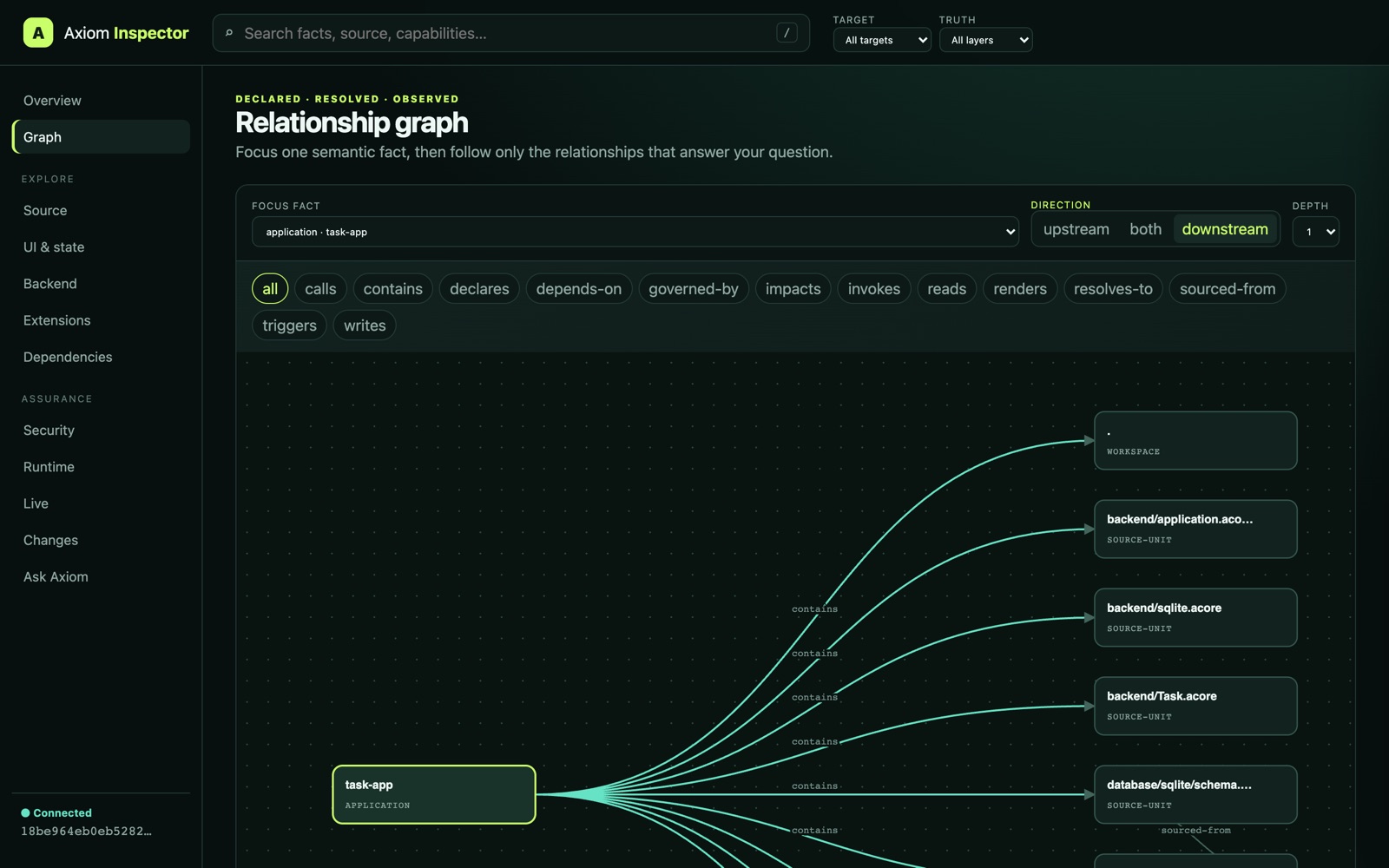
The Graph view for the documentation task app, tracing contains edges from
the application fact.